If you're using Breakdance builder and want to improve your site's semantic HTML structure, you might have noticed that wrapping your main content in a <main> tag isn't straightforward. Here's a simple JavaScript solution that automatically wraps your designated sections in a proper <main> element.
The Problem
With Breakdance builder you can only designate one section with the <main> tag. But what if you want multiple sections within <main>? Breakdance builder doesn't provide a native way to wrap multiple sections in a <main> tag. This is important for accessibility and SEO, as the <main> element helps screen readers and search engines identify the primary content of your page.
The Solution
This lightweight JavaScript snippet allows you to mark your first and last sections with custom attributes, and it automatically wraps everything in between with a <main> tag.
How It Works
The code is simple and efficient:
It waits for the DOM to fully load
Finds sections marked with [firstsection] and [lastsection] attributes
Creates a new <main> element
Moves all sections between (and including) the marked sections into the <main> tag
The Code
document.addEventListener('DOMContentLoaded', function() {
  const first = document.querySelector('[firstsection]');
  const last = document.querySelector('[lastsection]');

  if (first && last) {
    // Create the <main> element
    const main = document.createElement('main');

    // Insert <main> before the first section
    first.parentNode.insertBefore(main, first);

    // Move all elements between first and last (inclusive) into <main>
    let el = first;
    while (el) {
      const next = el.nextElementSibling;
      main.appendChild(el);
      if (el === last) break;
      el = next;
    }
  }
});
Implementation Steps
Add the JavaScript code to your Breakdance site using a code snippet plugin, or within the Breakdance custom code settings. If adding here, wrap it in <script> </script>
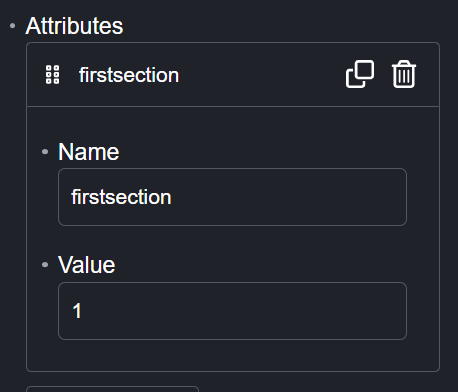
On each page or template within Breakdance builder, add a custom attribute 'firstsection' to the first section you want inside <main> and give it a value of 1
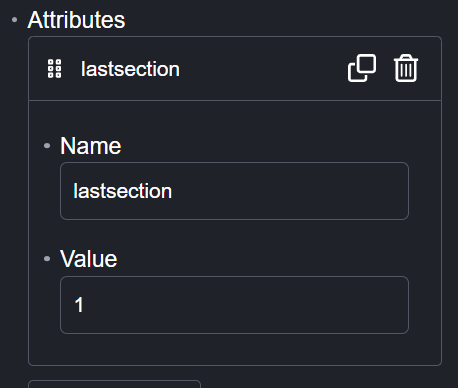
Add a custom attribute 'lastsection' to the last section you want inside <main> and give it a value of 1.
Save and publish your page
Benefits
Improved semantic HTML structure
Better accessibility for screen readers
Enhanced SEO
Clean, maintainable code
No impact on page performance
Conclusion
This simple solution bridges the gap in Breakdance builder's semantic HTML capabilities. By adding just a few lines of JavaScript and two custom attributes, you can ensure your site follows best practices for accessibility and SEO.
We use cookies to optimise our website and our service. It helps us if you allow them, but you can manage what cookies you allow through preferences.
Functional
Always active
The technical storage or access is strictly necessary for the legitimate purpose of enabling the use of a specific service explicitly requested by the subscriber or user, or for the sole purpose of carrying out the transmission of a communication over an electronic communications network.
Preferences
The technical storage or access is necessary for the legitimate purpose of storing preferences that are not requested by the subscriber or user.
Statistics
The technical storage or access that is used exclusively for statistical purposes.The technical storage or access that is used exclusively for anonymous statistical purposes. Without a subpoena, voluntary compliance on the part of your Internet Service Provider, or additional records from a third party, information stored or retrieved for this purpose alone cannot usually be used to identify you.
Marketing
The technical storage or access is required to create user profiles to send advertising, or to track the user on a website or across several websites for similar marketing purposes.